Built with Apple WeatherKit data

Weather makes more sense as a chart.

iPhone iPad Apple Watch Mac (Apple silicon) Widgets

Weathercaster is a chart-based weather app that puts rain, clouds, and temperature on one continuous timeline. See when conditions change and whether they affect your plans. Open the forecast for precipitation amounts and hourly details.Learn more

4.7★ App Store rating
Indie App independently made
Privacy No data collection
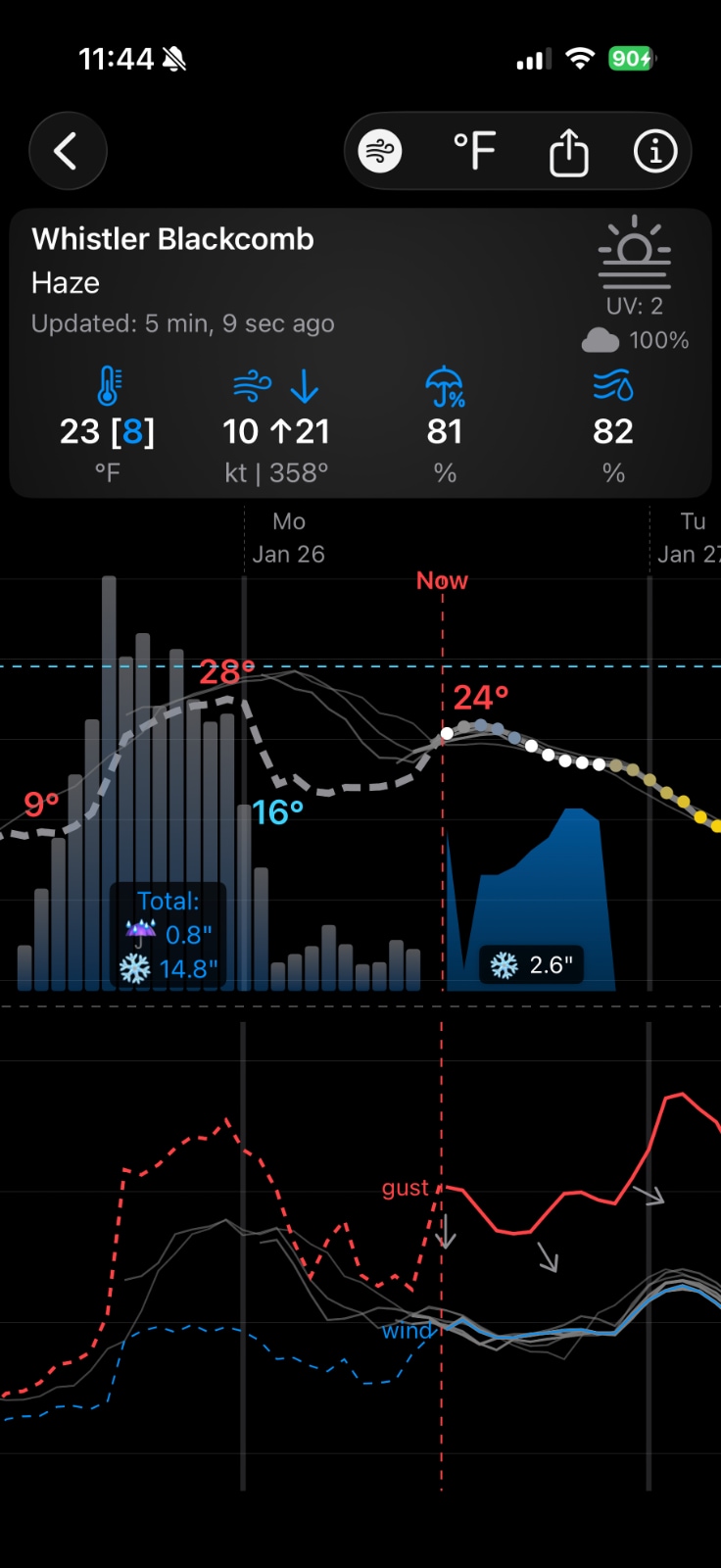
Weathercaster screenshot showing current conditions, forecast chart, and wind chart

What is Weathercaster?

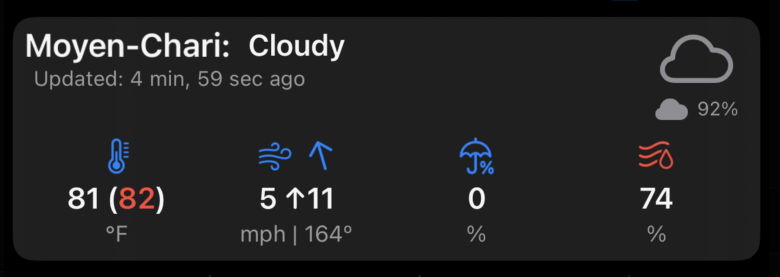
Weathercaster is a chart-based weather app for iPhone, iPad, and Apple Watch. Built on Apple WeatherKit data, it brings temperature, cloud cover, precipitation, and lightning risk into one timeline, with wind speed and direction in a dedicated chart.

How Weathercaster works

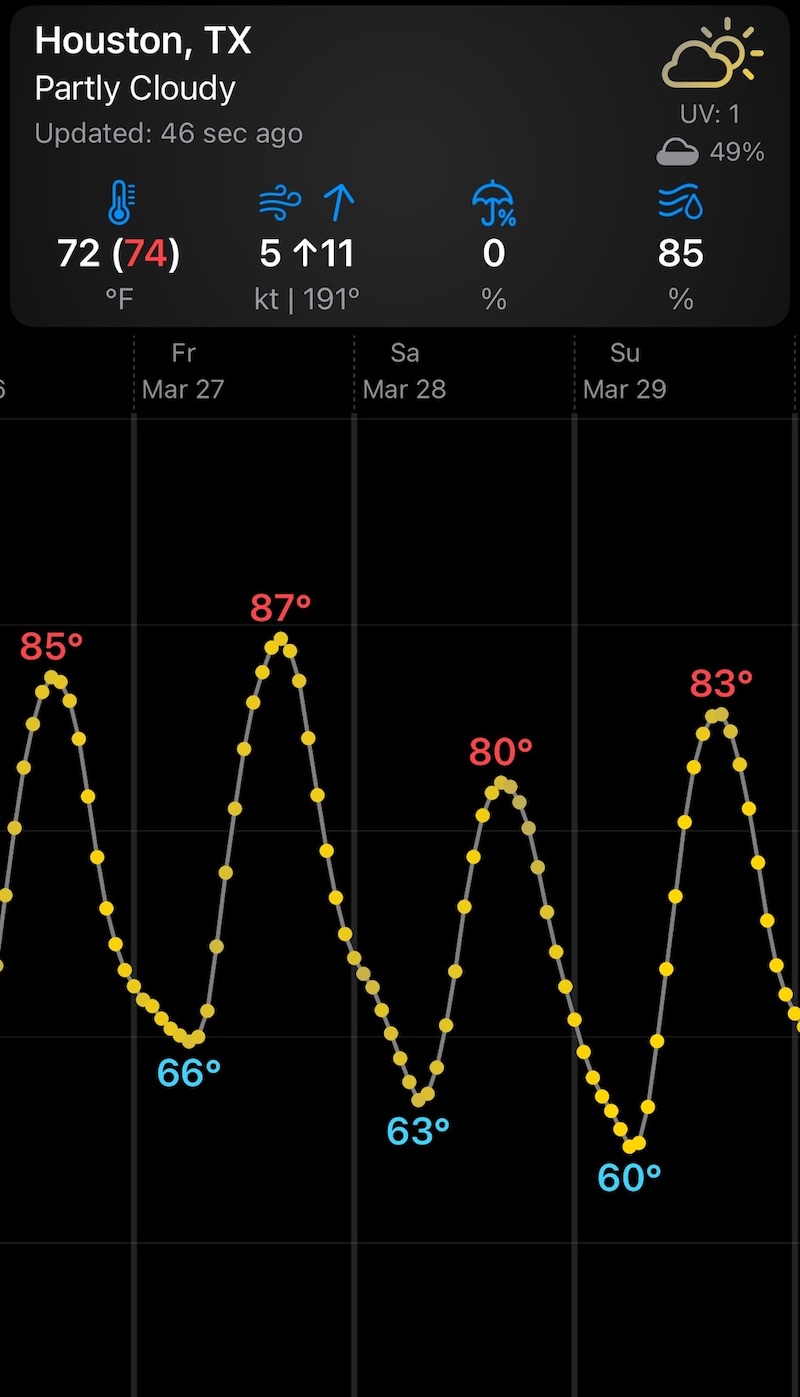
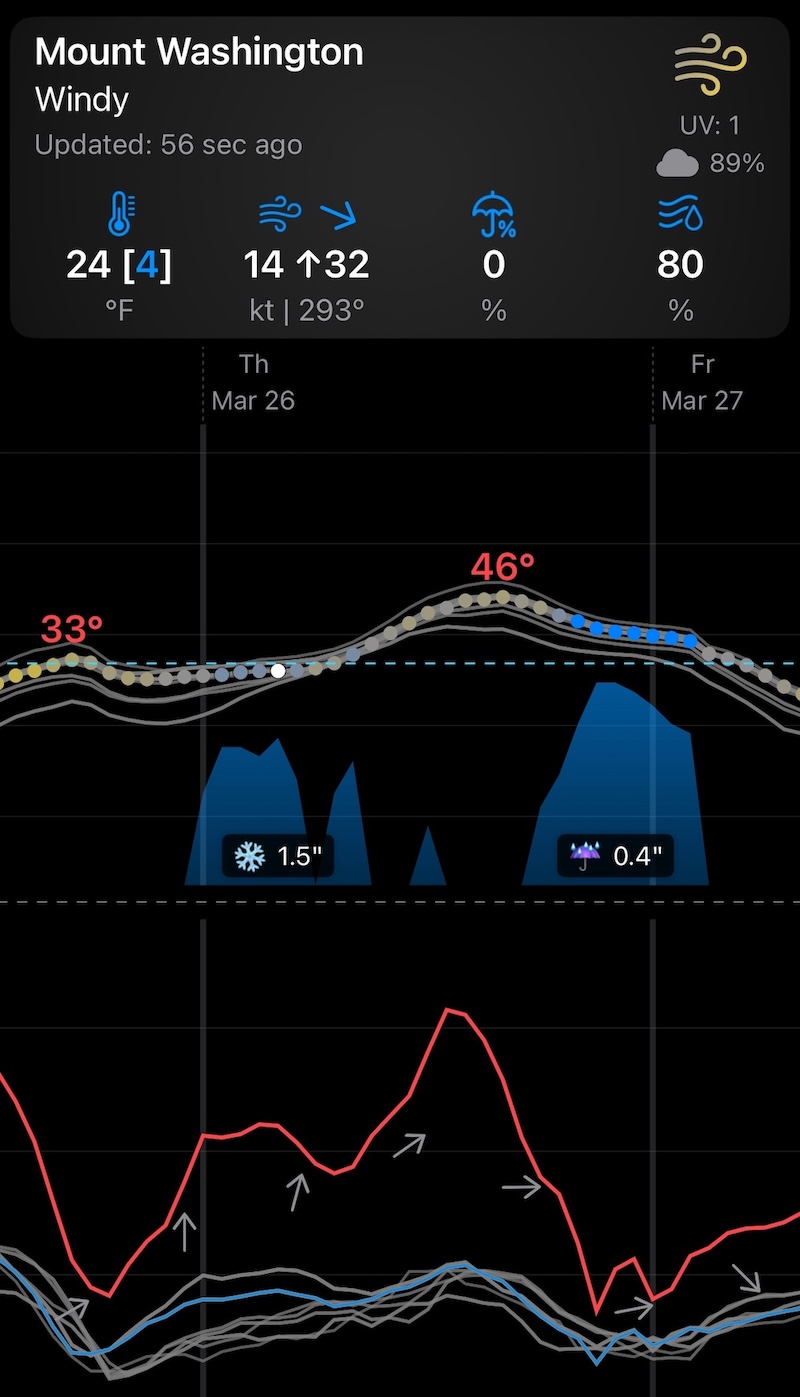
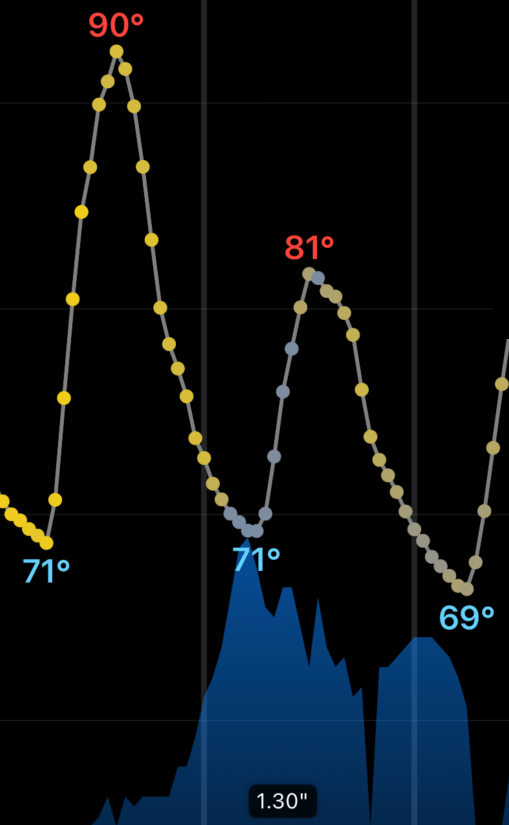
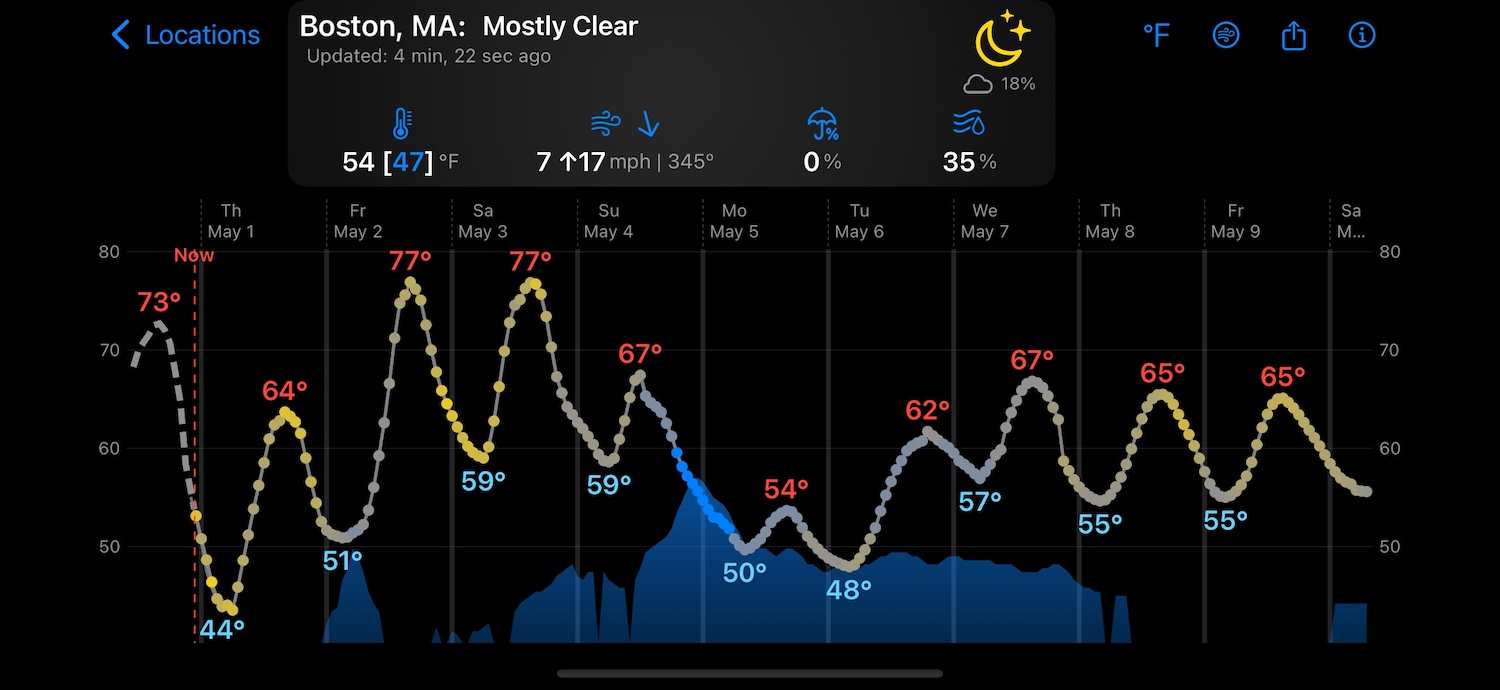
Weathercaster plots hourly temperatures as points colored by cloud cover, from gray for fully cloudy to yellow for fully sunny. The height of the blue shaded area shows precipitation probability, and significant events have rain or snow amount labels. Local temperature highs and lows and lightning-risk icons add context. Tap and hold to inspect an hour, rotate for a wider view, or enable the separate chart for sustained wind, gusts, and direction. Pro users can overlay older forecast runs to see how the outlook has shifted.

Who is Weathercaster for?

Weathercaster is designed for anyone who needs to understand weather timing, not just daily summaries. It is especially useful for sailors, hikers, boaters, pilots, and outdoor enthusiasts who need to know when rain will start and stop, not just that rain is expected. The chart format lets users see transition points between weather events at a glance.

Weathercaster vs. other weather apps

A daily rain icon can hide the hours that matter. Rain from 11 p.m. Friday to 5 a.m. Saturday affects your plans differently from rain all Saturday afternoon. Weathercaster shows the rain window and clearing skies together in the location preview, so you can spot a sunny Saturday morning. Open the forecast for expected amounts and hourly details.
Built around the chart

Weathercaster's core idea is simple: show more useful forecast context in a format you can scan quickly instead of making you bounce between dense tables and tiny icons.

Chart-first weather

Cloud cover, precipitation, and trend changes in one glance

Weathercaster's hourly points show temperature by their height and cloud cover by color: gray for fully cloudy, yellow for fully sunny, and a continuous gradient between them. Rain and snow appear in the precipitation area and event labels. Tap and hold to inspect a specific hour.

  • Point color shows cloud cover from fully cloudy gray to fully sunny yellow.
  • The line chart rises and falls with temperature, with labels showing maximums and minimums.
  • Lightning icons ⚡️ appear on the chart for hours when lightning is possible.
  • The height of the blue shaded area shows precipitation probability from 0% to 100%; its color stays the same.
  • Precipitation events are labeled with the likely amount of rain ☔️ and/or snow ❄️ that will fall.
  • Activate the wind chart for sustained speed, gust speed, and direction vectors.
  • In Pro, faded ghost lines can show older model runs so you can see where the forecast used to be and how it is changing.
  • Landscape mode gives you a full 10-day forecast view.
Weathercaster chart screenshot
Weathercaster full-screen landscape forecast view
Landscape mode

Turn your phone sideways for a wider forecast read

The app's help text points out one of the most useful tricks: rotate into landscape to see a full-screen 10-day forecast with much more room to read changing conditions.

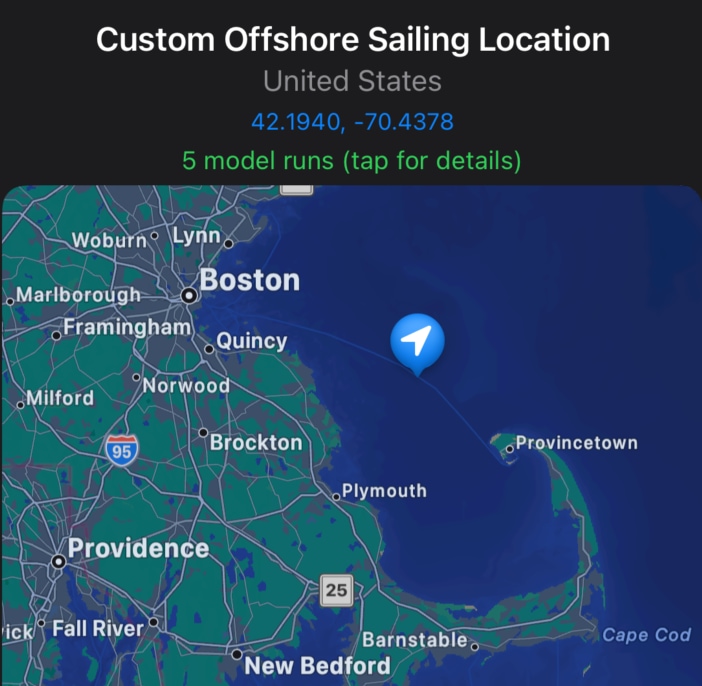
Weathercaster custom map location adjustment
Custom locations

Fine-tune the exact forecast spot

When search is close but not exact, Pro lets you move a pin on the map to dial in trailheads, ski areas, offshore points, or other hard-to-name places.

Share and inspect

Go deeper without getting lost

Zoom the chart, open the separate wind view, share current conditions or the forecast image, and export CSV data when you want to work with the forecast outside the app.

See what Weathercaster includes, and what Pro unlocks

Free mode already covers the core chart-first forecast experience. Pro adds more places, more control, and more ways to compare how the forecast changes over time.

Included Free

Everyday weather, without paying first

Free mode gives you the core Weathercaster experience for daily weather monitoring, including the chart view, quick inspection, widgets, and Apple Watch support. The main limitations are the number of locations you can add, small promos for our other apps, and the absence of Weathercaster's more advanced tools.

  • Add up to two locations through search.
  • Use the full chart-first forecast view with tap-and-hold inspection.
  • Keep your top location available on Apple Watch.
  • Keep your top location available in widgets.
  • Free locations stay simple, so they cannot be renamed or reordered.
  • Free users may see small, unobtrusive promos for other Catspaw apps, and those can be removed by upgrading to Pro.
Unlock with Pro

More places, more control, and deeper weather context

Pro is built for people who track more than a couple of spots, need more precise location control, or want to understand how the forecast is changing over time.

  • Track unlimited locations.
  • Rename and reorder your location list to keep it organized.
  • Move locations on a map for finer control, including offshore points and remote backcountry spots that do not show up in search.
  • Use shortcuts to add active tropical storms and hurricanes.
  • Export forecast data as CSV for offline analysis.
  • Show multiple model runs on the chart to see how forecasts are trending over time.
  • Remove the occasional Catspaw app promotions.

Questions people usually ask first

Yes. Weathercaster is free to download from the App Store.

Pro unlocks unlimited locations, location renaming and reordering, shortcuts for active hurricanes and tropical storms, map-based location adjustment, model runs on the chart, CSV export, and removal of occasional Catspaw app promotions.

Weathercaster runs on iPhone, iPad, Mac with Apple silicon, and Apple Watch.

Weathercaster uses Apple WeatherKit data, which Apple sources from forecast offices around the world. You can learn more about Apple WeatherKit's data sources here.

Yes. You can search for places, use your current location, or add a random location. Pro users can also add active hurricanes and tropical storms and fine-tune exact forecast spots on a map.

Weathercaster's location preview shows rain and cloud changes together across a continuous timeline. Open the forecast to inspect a specific hour, see expected precipitation amounts, and check the dedicated wind chart.

Yes. Weathercaster was originally inspired by meteorology tools used on wind farms, where chart-based forecasts help operators understand exactly when weather events will start and stop. That same timing precision is useful for hikers, sailors, boaters, and pilots. Pro users can place a forecast pin at exact coordinates on a map, including offshore points, mountain summits, and trailheads that do not appear in standard location search.

Daily summaries and separate condition charts can make an overnight storm look like two rainy days. Weathercaster shows when the rain starts and ends and when the clouds clear, so you can judge whether the next morning still works for your plans.

Yes. You can download a forecast before heading out, and it will remain viewable in the app while you are offline. This is useful for backcountry trips, sailing, or any situation where you may lose cell service.

Yes. Weathercaster includes Home Screen widgets for iPhone and iPad, plus a dedicated Apple Watch app. Both provide glanceable access to your top location's forecast without opening the full app.

Weathercaster is free to download and use with up to two locations. Pro is available as an in-app purchase and unlocks unlimited locations, hurricane tracking, map-based location adjustment, model-run overlays, CSV export, and removal of occasional Catspaw app promotions. Check the App Store listing for current pricing.

Weathercaster has no third-party ads, analytics, or trackers. Free users may occasionally see small promotions for other Catspaw apps. Your location is only accessed when you specifically request a forecast, and no personal data is collected or shared.

Learn more about Weathercaster

A practical comparison guide, use-case pages, and educational resources to help you decide whether chart-based forecasting fits how you plan.

Weathercaster app icon WeatherGraph icon art

From WeatherGraph to Weathercaster

In 2013, Mark and Jackson met at Southside Espresso in Houston, Texas. At the time, they were both independently building apps, trading ideas over coffee and staying connected in the years that followed. Eventually, they decided to collaborate.

Jackson's work in renewable energy, specifically on a meteorology team supporting wind farms, sparked the core idea. Forecast data for energy operators was delivered in chart form, making it faster to interpret and easier to act on. Compared to traditional weather forecasts, charts made complex data immediately understandable.

That insight became their first app: WeatherGraph. Built using National Weather Service data, it focused on clarity and speed through visual forecasting. While powerful, it had limitations, most notably being restricted to the United States due to its data source.

Years later, in 2024, Jackson set out to reimagine the concept from the ground up. The new project, initially codenamed Weatherpaw, was designed to take advantage of modern Apple technologies like SwiftUI and WeatherKit, while expanding beyond earlier constraints.

Mark rejoined the effort, and together they built something new.

That project became Weathercaster, a modern, visual-first weather app rooted in the same original idea: weather should be fast, clear, and intuitive to understand.

Start tracking weather visually

Download Weathercaster from the App Store, build your first forecast list, and decide later whether you want Pro's deeper weather tools.

Download on the App Store