The short answer
Weathercaster gets its forecast data from Apple Weather through WeatherKit. Apple Weather combines information from multiple weather models and providers, while Weathercaster turns the resulting point forecast into a continuous visual timeline.
Apple supplies the forecast data; Weathercaster helps you read its timing. A forecast can contain useful information yet leave the practical question unanswered: will the rain interrupt your plans? Weathercaster shows when weather events begin and end, how much precipitation is expected, and what conditions follow. It does not claim to make Apple's underlying forecast more accurate.
Where does Apple Weather data come from?
WeatherKit is not a single weather model. Apple describes the Apple Weather service as using high-resolution weather models together with machine learning and prediction algorithms. Its published source list includes:
- Weather models from organizations including NOAA and the US National Weather Service, Environment and Climate Change Canada, Deutscher Wetterdienst, Météo-France, the Japan Meteorological Agency, the Met Office, and ECMWF.
- Weather-station observations from NOAA/NWS and the Japan Meteorological Agency.
- Radar data from providers including the Australian Bureau of Meteorology, EUMETNET, the Japan Meteorological Agency, NOAA/NWS, and the Met Office.
- Severe-weather alerts from national and regional agencies in supported countries.
Apple publishes these providers by type of data, not as a simple list showing which model controls the forecast in each country. It also does not publish the precise weighting of every source at every location. That is why it is more accurate to say Weathercaster uses Apple Weather data than to claim it always uses one particular model.
What Weathercaster receives from WeatherKit
For a selected location, WeatherKit provides Weathercaster with current conditions and an hourly forecast that can include temperature, sky conditions, precipitation probability and amount, wind, humidity, visibility, pressure, and other weather variables. Some data products are not available in every country or region.
Weathercaster uses the parts of that forecast that best answer planning questions such as:
- When is the temperature expected to rise or fall?
- When will clouds give way to rain or snow?
- How much precipitation is associated with a particular weather event?
- When will the wind strengthen or change direction?
- Is there a thunderstorm signal in the forecast?
What Weathercaster adds
Weathercaster keeps the hours connected. Temperature forms the main line, its hourly points are colored by cloud cover, and the height of a blue area shows precipitation probability. A dedicated wind chart shows sustained speed, gusts, and direction. The compact location preview gives you the shape of the forecast at a glance; open the location to inspect an hour and see event amounts.
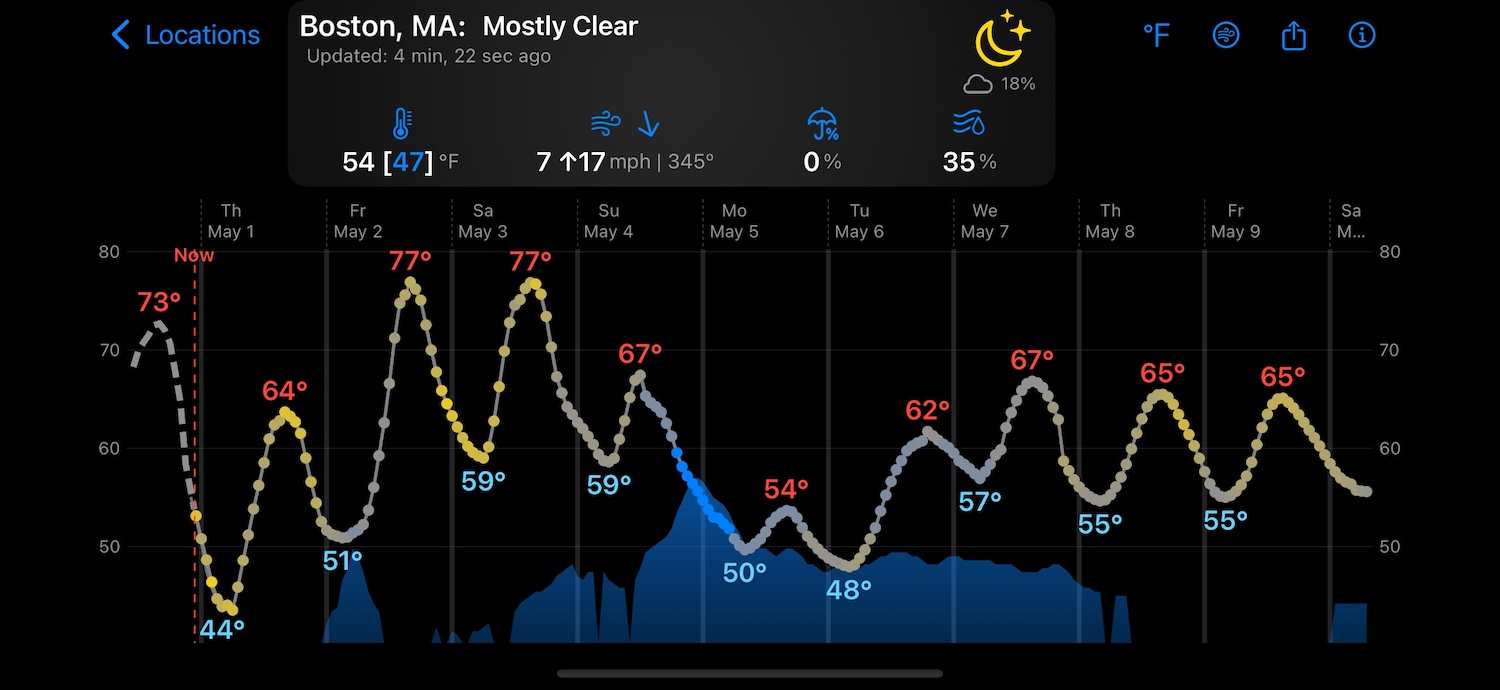
Apple Weather data, charted for timing
- See multiple days as one continuous forecast.
- Read changing conditions from left to right.
- Connect precipitation timing with temperature and cloud changes.
- Inspect a specific hour or rotate for a wider view.
Weathercaster Pro adds tools around that presentation. You can adjust a forecast pin to an exact location, compare older forecast runs to see how the outlook has shifted, export forecast data as CSV, and quickly add active tropical systems. These features help you investigate the forecast; they do not replace or alter Apple's underlying weather model.
Why Weathercaster and Apple Weather may look different
Using the same broader weather service does not mean two apps will always look identical. Apps may request different coordinates or forecast fields, refresh at different times, cache data differently, round values differently, and emphasize different parts of the response.
Apple Weather offers daily summaries and useful charts for individual conditions. To understand several variables together, you may need to switch between views. A storm from 11 p.m. Friday to 5 a.m. Saturday might make both days look rainy in a summary, while the hourly detail shows a dry, clearing Saturday morning. Weathercaster puts the rain window, expected amount, cloud changes, and temperature on one timeline so you can read that story quickly. Shared data does not guarantee identical readings or accuracy in every situation.
How accurate is WeatherKit?
No weather forecast is perfect. Accuracy varies with location, forecast horizon, available observations, and the kind of weather developing. A forecast for the next few hours usually carries less uncertainty than one many days away, and fast-developing local storms can be particularly difficult to time precisely.
Weathercaster presents the forecast Apple supplies without claiming certainty it does not have. Pro users can overlay older forecast runs to see whether the forecast has remained stable or shifted over time. That comparison can provide useful context, but it is not a guarantee of accuracy.
For safety-critical aviation, marine, emergency, or outdoor decisions, use the appropriate official forecasts, warnings, and specialist sources alongside any consumer weather app.
Location privacy
Apple says WeatherKit uses a requested location only to provide a weather forecast, does not associate it with personally identifiable information, and does not track it between requests.
Weathercaster also does not require an account, use third-party analytics or trackers, or follow your location. It checks your current location temporarily only when you ask it to—for example, by tapping “Use My Location” while adding a forecast location. Saved forecast locations remain part of your Weathercaster setup, but Weathercaster does not need continuous location tracking to update them.
There are no third-party ads. Free users may occasionally see a small, untracked promotion for another Catspaw app.
Coverage and limitations
- Weather data varies by region. The quality and density of local observations, radar, and reporting networks are not uniform worldwide.
- Some products are regional. Next-hour precipitation and severe-weather alerts are available only in supported countries and regions.
- Weathercaster is a forecast tool, not an official warning service. Always follow relevant government and emergency guidance when conditions may be dangerous.
- Forecasts change. New observations and model runs can move the expected timing, amounts, or path of a weather event.
Frequently asked questions
Where does Weathercaster get its forecast data?
Weathercaster gets its forecast data from Apple Weather through WeatherKit. Apple Weather uses multiple weather models and data providers rather than relying on one source everywhere.
Is WeatherKit the same as the Apple Weather app?
No. Apple Weather is the consumer app that comes with Apple devices. WeatherKit is the service that lets Weathercaster and other apps retrieve data from the underlying Apple Weather service.
Do Weathercaster and Apple Weather show identical forecasts?
Not necessarily. Both can use Apple Weather data, but apps may request different locations or forecast fields, refresh at different times, cache data differently, and present the results in different ways.
Does Weathercaster track my location?
No. Weathercaster does not follow your location. It checks your current location temporarily only when you ask it to, such as when you tap Use My Location while adding a forecast location.