The short version
There is no single best weather app for every person or every situation. Apple Weather offers daily summaries and charts for individual conditions, but comparing rain, clouds, and temperature can mean switching views. Other apps emphasize radar, maps, customization, alerts, or access to many forecast models.
Weathercaster takes a narrower approach: it turns a point forecast into a continuous visual timeline. The goal is not to show every possible weather product. It is to make the timing and interaction of changing conditions easier to understand.
Weathercaster may fit you if you often ask:
- When will the rain actually start and stop?
- Will the wind rise before or after the temperature drops?
- Is this a brief shower or part of a longer change in conditions?
- What will the weather be at a trailhead, marina, summit, or offshore point?
What “chart-first” means
A daily icon is useful for a quick check, but it compresses hours of changing weather into one symbol. Weathercaster keeps the hours connected. Temperature forms the main line, point color communicates sky conditions, blue shading shows precipitation probability, and lightning markers highlight hours with storm risk. A dedicated wind chart shows speed and direction on the same forecast timeline.
This format makes transition points easier to spot. You can see clouds give way to rain, notice whether wind rises before or after a front, and find the dry window between two weather events.
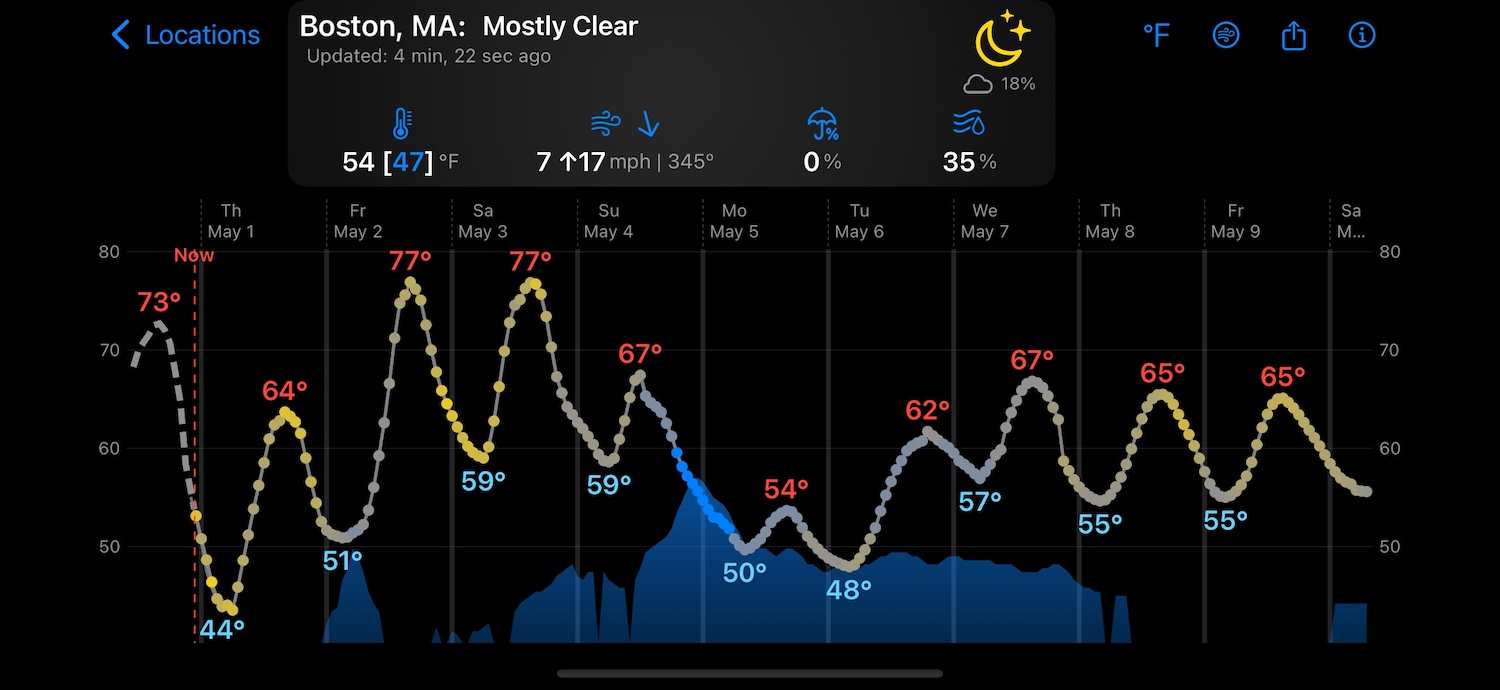
Read the forecast from left to right
- The line rises and falls with temperature.
- Point color grades from gray for cloudy to yellow for sunny.
- The height of the blue area shows precipitation probability; the color stays the same.
- Event labels show likely rain and snow amounts.
- Lightning markers highlight hours with storm risk.
How Weathercaster approaches weather differently
Timing before summaries
Weathercaster is built for questions about when. Instead of treating each day as a single block, the chart shows the forecast hour by hour across multiple days. Rotate your device for a wider 10-day view or press and hold to inspect a specific hour.
Relationships between conditions
Weather variables do not change in isolation. Temperature, clouds, precipitation, lightning, and wind often move together. Weathercaster's visual approach helps you read those relationships instead of checking each condition as a disconnected number.
Precipitation totals by event, not by day
Imagine a storm forecast from 11 p.m. Friday to 5 a.m. Saturday. A daily summary may mark both days as rainy, even if the clouds clear and Saturday morning is ideal for a hike. Weathercaster shows the rain as one event, with its expected amount and timing alongside the clouds and temperature. You can see when it starts, when it ends, and what the rest of Saturday looks like without piecing together separate views.
Forecasts for the exact place you care about
Place names are not always precise enough for outdoor planning. Weathercaster Pro lets you tap and drag a map pin to an exact spot, including a trailhead, mountain summit, ski area, marina, or offshore location that may not appear in a normal search.
Tools for deeper forecast work
When you need more than a glance, Pro can overlay older forecast runs to show how the outlook has shifted. Understanding forecast variance can give you insight into the reliability of forecast data for a specific location. Pro also includes CSV export for users who want to integrate the data into their own workflows. Weathercaster provides shortcuts for adding and tracking active hurricanes, typhoons, and tropical storms.
Privacy without an account
Weathercaster does not require an account and uses no third-party ads, analytics, or trackers. Free users may occasionally see a small promotion for another Catspaw app, but those promotions do not use tracking or third-party ad networks. We also do not ask for your location up front or follow your location. We check it temporarily only when you ask us to—for example, by tapping “Use My Location” while adding a location to the app.
When another kind of weather app may be better
Weathercaster is intentionally focused on charts, and that means it is not the right primary tool for every job.
- If you want animated regional radar or broad map exploration, a map-first weather tool may fit better. We think Weathercaster makes a good companion for radar apps such as RadarScope.
- If you want to compare many different forecast models, use a specialist model-viewing service. We think LuckGrib is a great companion app for this.
- If you need Android or a full web app, choose a cross-platform service; Weathercaster is built for Apple devices.
- If weather affects safety-critical decisions, use the appropriate official aviation, marine, emergency, or government weather sources as well.
Many people use more than one weather tool. Weathercaster can be the clear local timeline alongside radar, official alerts, or specialist forecasts.
How to choose a weather app
Before downloading another app, decide what you need it to answer:
- Do you need a quick summary or detailed timing? Daily cards are fast; timelines are better for planning around changes.
- Are you studying one place or a whole region? Point forecasts show local detail; maps show the larger weather system.
- Do you need general guidance or specialist data? Outdoor, aviation, and marine decisions may require dedicated official sources.
- Which devices and privacy tradeoffs matter? Check platform support, account requirements, tracking, subscriptions, and offline access.
Frequently asked questions
What makes Weathercaster different from other weather apps?
Weathercaster is built around a continuous forecast chart. It brings temperature, sky conditions, precipitation timing, and lightning risk into one visual timeline, with a dedicated wind chart for speed and direction.
Who is Weathercaster best for?
Weathercaster is a strong fit for people who plan around changing conditions, including hikers, sailors, boaters, pilots, travelers, and anyone who wants to understand when weather will change rather than only seeing a daily summary.
How does Weathercaster show precipitation totals?
Weathercaster divides precipitation into discrete weather events and shows both the expected amount and timing. This makes it easier to tell whether rain will affect daytime plans or fall overnight.
Does Weathercaster track my location?
No. Weathercaster does not ask for your location up front or follow your location. It checks your location temporarily only when you request it, such as when you tap “Use My Location” while adding a location.
Does Weathercaster replace radar or official weather tools?
No. We have intentionally kept Weathercaster streamlined and focused on readable forecast charts, weather-event timing, and precipitation totals. We think dedicated apps provide better radar tools, and official aviation or marine weather sources may still be important depending on the activity and risk involved.
Can Weathercaster be used offline?
Yes. You can download a forecast before you lose connectivity and continue viewing it while offline.
Is Weathercaster free?
Weathercaster is free to use with up to two locations. Pro adds unlimited locations, exact map-pin adjustment, forecast-run overlays, storm shortcuts, CSV export, and other advanced tools.